

 One of Windows 10’s most notable features is support for universal apps, an expansion of the Metro-style apps first introduced in Windows 8. Universal apps can be designed to run across multiple Microsoft product families with nearly identical code—including PCs, tablets,smartphones, embedded systems, Xbox One, Surface Hub and Mixed Reality.
Fixes in this Build :-
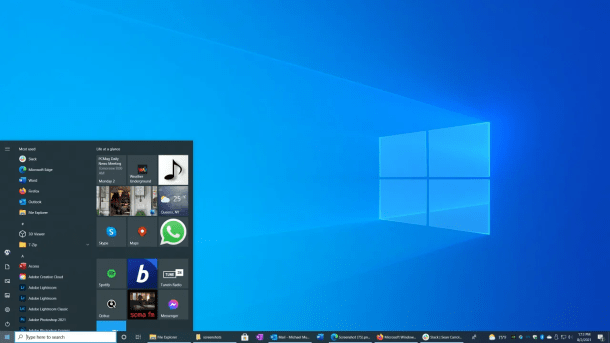
- Start Menu with Live Tiles – Combines the classic Windows 7 menu with interactive tiles that show real-time updates like weather, news, and calendar.
- Cortana Voice Assistant – A built-in digital assistant that helps with reminders, searches, and performing quick tasks using voice commands.
Virtual Desktops – Lets you create multiple desktops, so you can keep work, personal, and entertainment tasks organized separately. - Task View – A single button that shows all your open apps and windows at once, making multitasking easier.
- Snap Assist – Allows you to neatly arrange windows on the screen by snapping them to the sides or corners.
- Microsoft Edge Browser – A faster, modern browser introduced with Windows 10 (later upgraded to the Chromium-based Edge).
- Universal Windows Apps – Apps from the Microsoft Store that run on PC, tablet, and even Xbox, giving a consistent experience.
- Continuum Mode – For hybrid devices, it automatically adjusts between desktop mode and tablet mode.
- Action Center – A notification panel that gathers alerts, messages, and quick settings like Wi-Fi, brightness, and Bluetooth.
- Windows Hello – Secure sign-in using face recognition, fingerprint, or a simple PIN instead of passwords.
- BitLocker Encryption – Protects data on your hard drive with strong encryption (available in Pro and Enterprise editions).
- Windows Defender Antivirus – Built-in security tool that protects against viruses and malware without needing extra software.
- Regular Updates – Keeps the system secure and up to date with automatic feature and security updates.
- DirectX 12 – Improves graphics and gaming performance, making games run smoother and faster.
- Game Mode – Prioritizes system resources for gaming to reduce lag and improve performance.
- Xbox Integration – Connects your PC to Xbox Live, allowing streaming, recording gameplay, and social gaming features.
- Backward Compatibility – Supports most older apps and programs from Windows 7 and 8, making it reliable for long-term users.
- Cross-Device Sync – Syncs settings, themes, and apps across all devices using your Microsoft account.
- OneDrive Integration – Built directly into File Explorer, allowing you to save and access files from the cloud easily.
How To Install?
- Download the build.
- Create a bootable drive or Install from ISO.
- Select the Windows type you want to install.
- Skip the activation for now.
- Let the windows installation get finished.
- After installing, run the activator as admin.
- Use the activator to activate your windows.
- Boom! Enjoy the activated Build.
Download (5.0 GB) :