

ExactScan Pro is the professional scan solution for a paperless office on the Mac. ExactScan comes with over 400 drivers for professional document scanners from Avision, Canon DR-series, Fujitsu fi-series, Kodak, Oki, Panasonic, Visioneer, and Xerox, which otherwise do not come with a Mac driver. Additionally, it allows using any other scanner with TWAIN or ImageCapture driver. Scan all your documents for fast retrieval, and get rid of dusty paper archives.
- macOS 10.9 or later 64-bit
- Over 400 native built-in drivers for professional document scanners from Avision, Canon, Fujitsu, HP, Kodak, Oki, Panasonic, Visioneer, and Xerox
- Support for a variety of third party scanners via ImageCapture and TWAIN driver
- Save to PDF, TIFF, JPEG, JPEG 2000, PNG, BMP, PNM
- Advanced and intelligent image processing algorithms
- Auto-crop & de-skew
- Blank page removal
- Direct scan to print
- Profiles to configure scan workflow
- AppleScript support for professionals
ExactScan Pro additionally includes:
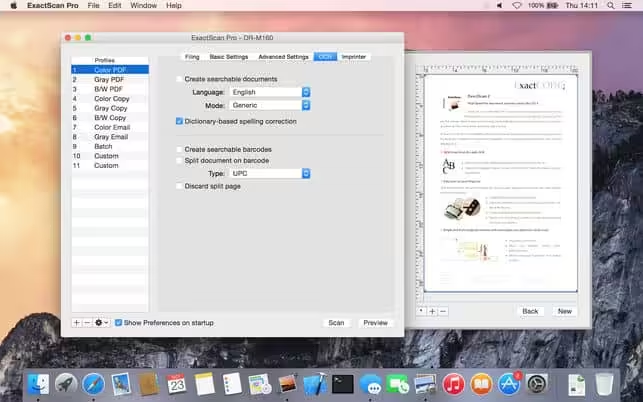
- OCR to directly create searchable PDF files
- Content-based page de-skew
- Automatic rotation, color- and source detection
- Imprinter to print flexible text into the scanned image
- Barcode recognition to file stacks by barcodes
- Batch processing of existing image files
The following languages are supported by the OCR:
- Bulgarian, Croatian, Czech, Danish, Dutch, English, Estonian, French, German, Hungarian, Italian, Latvian, Lithuanian, Polish, Portuguese, Rumanian, Russian, Serbian, Slovenian, Spanish, Swedish, Turkish, Ukrainian, and Norwegian.
- added suport for new scanners
- improved support for various scanners
- various other improvements
How to Disable System Integrity Protection in MacOS: https://codelofi.com/how-to-disable-system-integrity-protection-in-macos/
How can i fix damaged app message on macOS Mojave: https://codelofi.com/how-can-i-fix-damaged-app-message-on-macos-mojave/