


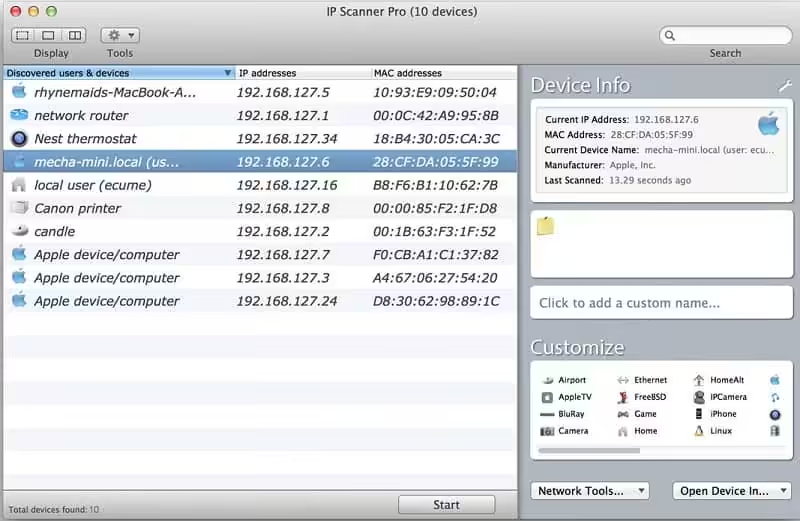
IP Scanner scans your local area network to determine the identity of all machines and Internet devices on the LAN. It was designed to allow you to customize your scan results; once a device has been identified, you may assign it a custom icon and name to more easily recognize it at a glance. Powerful results, yet easy and intuitive to use.
- macOS 10.9 or later 64-bit
- Sort network list by device name, IP address, MAC address, or Last Seen
- Growl support for notifications of newly discovered devices and changes in device state
- Right-click a device to obtain additional contextualized tool options, including Ping, WOL, and Port Scan tools
- Local network segments are scanned automatically; custom ranges may be added manually
- Get an overview of the current network or view changes over time in the ‘cumulative mode’
- Highly configurable display – don’t need to see the MAC address column…don’t display it! Text too small…make it larger!
- Double-click a device to obtain more information and to customize its appearance; assign custom icons based on MAC address or IP number
- Add devices you know to a whitelist to better highlight new/unknown ones
- latest device profiles
How to Disable System Integrity Protection in MacOS: https://codelofi.com/how-to-disable-system-integrity-protection-in-macos/
How can i fix damaged app message on macOS Mojave: https://codelofi.com/how-can-i-fix-damaged-app-message-on-macos-mojave/